Canva Alternatives for New Zealand Small Businesses
While Canva is a popular choice for online graphic design, it isn't the only option.
New Zealand small businesses looking for localised support, simpler interfaces, or different pricing models can choose from several strong alternatives.
Dzyn Space leads the pack as a New Zealand-tailored platform with built-in freelancer support, followed by international tools like Adobe Express, VistaCreate, and Piktochart.
When it comes to DIY graphic design, Canva is usually the first tool people mention. It revolutionised how non-designers create social media graphics, flyers, and banners.
However, Canva isn't perfect for everyone. Over time, its interface has grown crowded with complex features, subscription costs have risen, and its massive global template library can make your business look like everyone else's.
If you run a business in New Zealand having the right design platform can save you time, money, and frustration.
Here is a look at the best Canva alternatives available for Kiwi small businesses, including their pros, cons, and best use cases.
1. Dzyn Space (Best Overall for NZ Small Businesses)
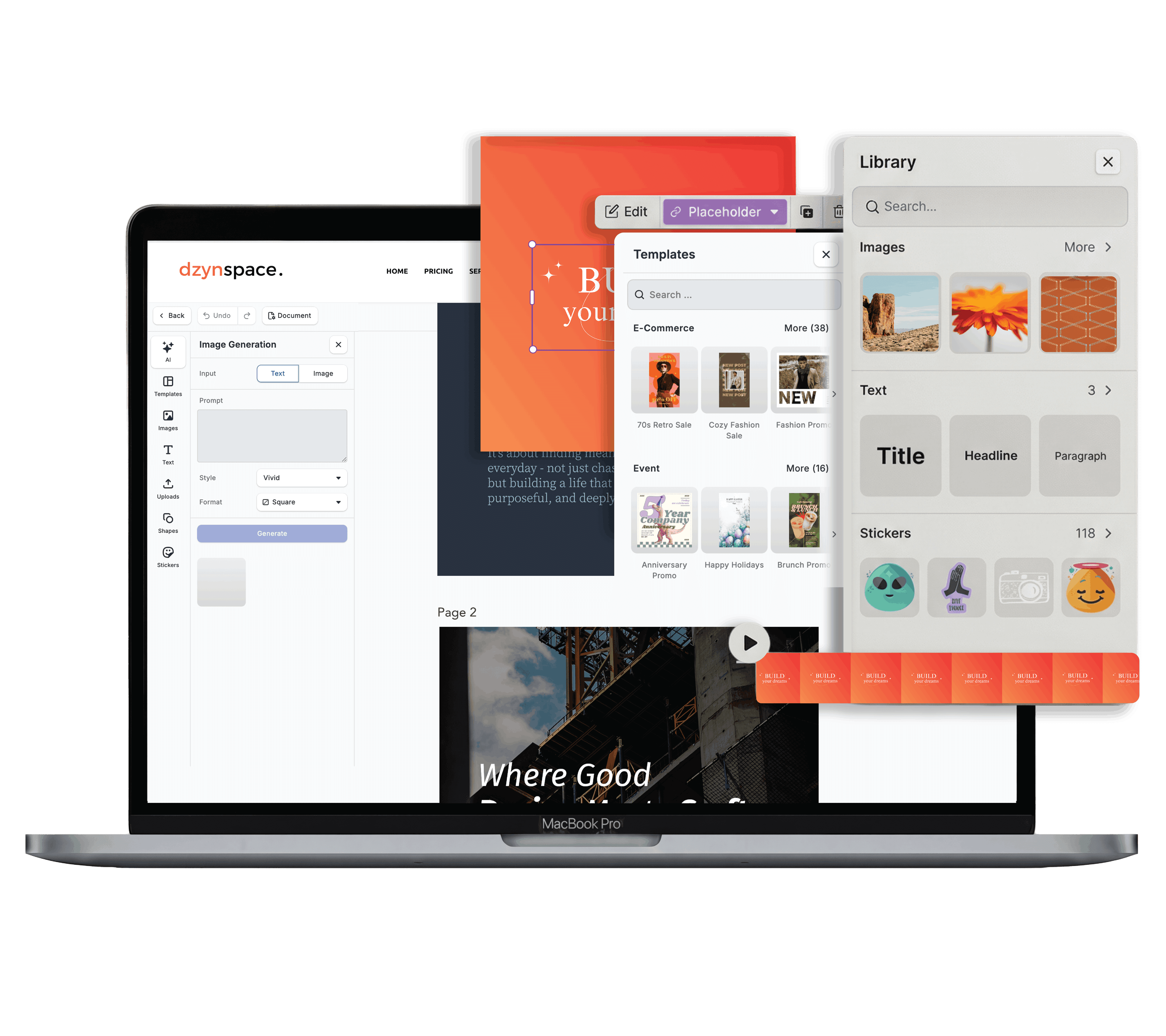
Dzyn Space is a design and content platform built specifically with New Zealand small businesses in mind. It balances powerful DIY editing tools with direct access to local design support when you need a professional hand.
Pros:
- Tailored for Kiwi Businesses: Offers template categories, aspect ratios, and print-ready specs pre-configured for New Zealand standards.
- Hybrid Freelancer Support: Unlike purely DIY platforms, Dzyn Space connects you directly with vetted design freelancers who can set up custom master templates in your workspace that you can edit yourself later.
- Clean, Uncluttered Workspace: Features a streamlined interface that doesn't overwhelm non-designers with unnecessary tools.
- Built-in Brand Centralisation: Easily pin your official company logos, brand fonts, and Hex colour codes to your editing sidebar.
Cons:
- Smaller global template library compared to giant international platforms (though templates are more curated).
Best For: Kiwi small business owners who want an easy-to-use DIY editor combined with local support and tailored print settings.
2. Adobe Express (Best for Adobe Ecosystem Users)
Formerly known as Adobe Spark, Adobe Express is Adobe's direct answer to Canva. It brings lightweight versions of Photoshop and Illustrator tools into a simple web browser interface.
Pros:
- Adobe Stock Integration: Access millions of high-quality royalty-free photos, graphics, and Adobe Fonts.
- One-Click Quick Actions: Excellent background removal, image conversion, and simple video editing tools.
- Seamless Integration: Works smoothly if your business already uses Adobe Creative Cloud products.
Cons:
- Advanced features require a paid monthly subscription.
- Can feel slightly technical for complete design beginners.
Best For: Businesses already using Adobe software or those who need access to high-end stock imagery.
3. VistaCreate (Best for Print Integration)
Formerly called Crello, VistaCreate is owned by VistaPrint. It offers a design interface nearly identical to Canva, with a strong focus on merging digital designs with physical print products.
Pros:
- Direct Print Ordering: Easily send your finished flyers, banners, and business cards directly to print through VistaPrint.
- Large Media Library: Includes thousands of pre-made templates, animated objects, and music tracks.
- Good Free Plan: Offers access to basic design tools and assets without immediate payment.
Cons:
- Shipping printed items to New Zealand can sometimes involve longer delivery times or international freight costs.
- Template styles lean heavily toward North American and European design trends.
Best For: Businesses that focus heavily on physical print marketing alongside basic social posts.
4. Piktochart (Best for Data & Infographics)
If your business needs to turn complicated data, quarterly reports, or research figures into clean visual graphics, Piktochart is a specialised alternative.
Pros:
- Data Visualisation: Built specifically for creating professional infographics, charts, maps, and visual reports.
- Professional Layouts: Keeps complex data looking clean, structured, and easy to digest.
- Easy File Exports: Download high-resolution PDFs and image files ready for presentations or client proposals.
Cons:
- Not designed for everyday social media posts or quick promotional banners.
- Free plan limits the number of active visual projects you can create.
Best For: Professional service providers, consultants, and business analysts who present data to clients regularly.
Canva Alternatives Comparison
| Platform | Local NZ Focus | Best Feature | Pricing Model |
|---|---|---|---|
| Dzyn Space | High (Built for NZ) | Localized templates & built-in freelancer network | Free tier & flexible plans |
| Adobe Express | ❌ Global | Integration with Adobe Stock & Creative Cloud | Free plan & paid monthly tier |
| VistaCreate | ❌ Global | Seamless print ordering via VistaPrint | Free plan & paid monthly tier |
| Piktochart | ❌ Global | Specialist infographic & report creation | Free trial & paid plans |
How to Choose the Right Tool for Your Business
When picking a Canva alternative, consider your team's workflow:
- If you want local support and simplicity: Choose Dzyn Space to keep your branding consistent and tap into Kiwi freelancer assistance when needed.
- If you already pay for Adobe tools: Look into Adobe Express to keep your media assets connected.
- If you present data to corporate clients: Use Piktochart for infographics and reports.
Frequently Asked Questions
Can I import my existing Canva designs into Dzyn Space?
Yes. You can export your graphics from Canva as high-resolution PNGs or PDF files and upload them directly into your Dzyn Space asset library to continue editing and customizing them.
Are these Canva alternatives free to use?
Most platforms offer a free version or trial. Dzyn Space provides free access to core editing features, with options to upgrade for advanced brand kits and direct freelancer support.
Why should I choose a localised tool like Dzyn Space over global apps?
Global tools design templates for international markets, often using non-standard print sizes, generic stock photos, or foreign layout norms. Localised tools ensure your dimensions, print setups, and brand templates fit New Zealand standards out of the box.
Do I need a high-end computer to run these design tools?
No. All of these platforms operate directly inside your web browser (like Google Chrome or Safari), meaning you can design graphics on almost any standard laptop or desktop computer without downloading heavy software.